
PageSpeed Insights
What Google measures
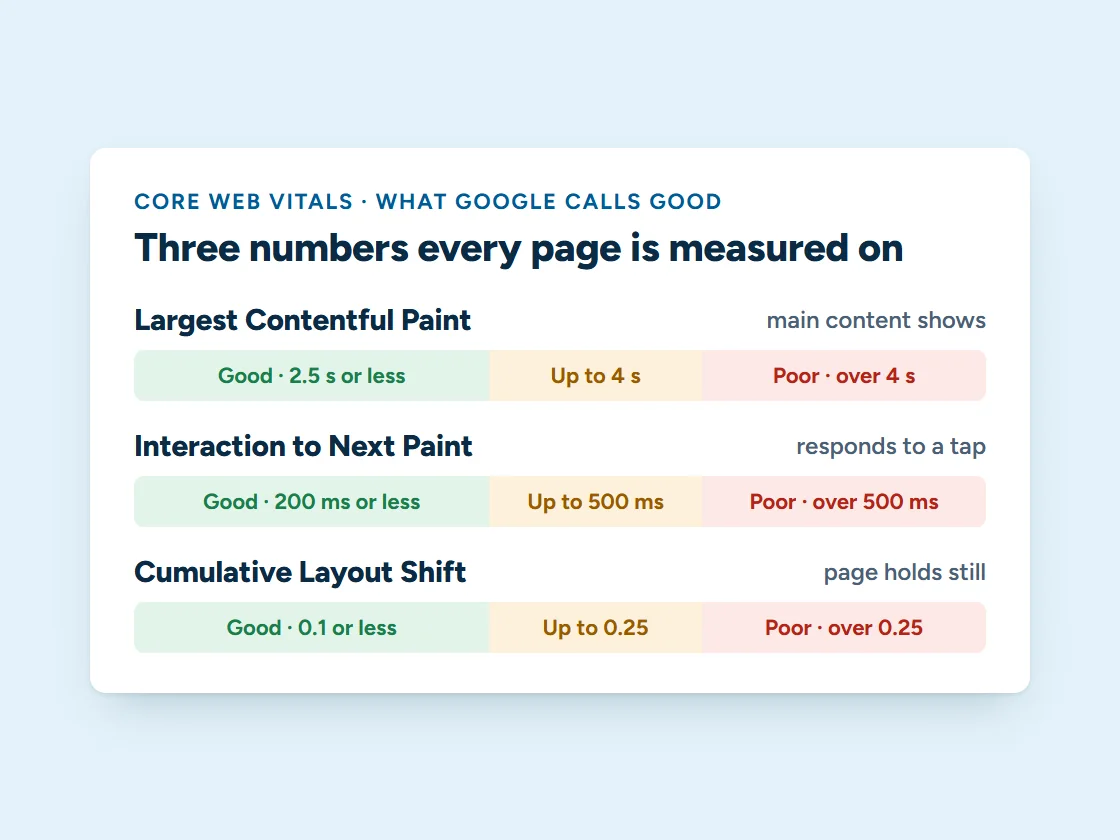
Google’s PageSpeed Insights grades a page from 0 to 100 for mobile and for desktop. The score comes from a test load of your page. Where enough people visit, it also shows how fast the page is for real visitors, using three measurements Google calls Core Web Vitals:
- Largest Contentful Paint: how long until the main content shows. Good is 2.5 seconds or less.
- Interaction to Next Paint: how quickly the page responds to a tap or click. Good is 200 milliseconds or less.
- Cumulative Layout Shift: how much the page jumps around while it loads. Good is 0.1 or less.
Core Web Vitals are part of how Google evaluates pages, and they’re what your visitors feel: a page that loads fast and holds still gets read, tapped and called.
What we fix
Where speed usually goes
Images
Photos resized to the space they fill and served as WebP, so phones aren’t downloading desktop-sized files.
Heavy scripts and plugins
Unused plugins removed, and chat widgets, forms and trackers loaded when they’re needed instead of before the page can show.
Pages that jump
Space reserved for images, forms and embeds, so nothing shifts while the page loads.
Fonts
Self-hosted, trimmed fonts that show text right away instead of waiting on another server.
Caching and hosting
Pages cached and served from fast hosting, so the server answers quickly every time.
Mobile first
Every fix measured on a mid-range phone on a mobile connection, the way Google tests and most visitors browse.
Proof
We do it to our own site first
Measured on careyenterprises.com in October 2026, with Lighthouse, the engine behind PageSpeed Insights.
100
Our homepage on desktop, in every category: performance, accessibility, best practices and SEO.
97
Our homepage performance score on a phone (middle of three runs).
59 → 82
Our contact page on a phone, after we made its form load only when a visitor scrolls near it. On desktop it went from 89 to 100.
How it works
Measure, fix, prove it
Step 1
Measure
We test your key pages in PageSpeed Insights on mobile and desktop and record the starting scores.
Step 2
Fix the biggest costs first
We start with what costs the most time, usually images, scripts and layout shifts.
Step 3
Show the before and after
You get the new scores side by side with the old ones, page by page.
Step 4
Keep it fast
Updates and new plugins can slow a site down again. On a managed plan we keep an eye on it.
Pricing
What website speed optimization costs
Speed work is a one-time job with a fixed price, and it’s included in our managed website plans.
| Your site | Price | What happens after |
|---|---|---|
| WordPress site | $497, one time | You get the before and after scores; keeping it fast is up to you or your developer |
| Shopify store | $997, one time | You get the before and after scores; apps you add later can slow it again |
| On a managed plan | Included | We keep an eye on it as part of the upkeep |
Not sure where your site stands? Run it through PageSpeed Insights yourself, or ask for a free website audit and we’ll tell you what we’d fix first. The managed plans start at $297 a month.
Questions
Website speed questions
How much does website speed optimization cost?
A one-time $497 for a WordPress site or $997 for a Shopify store. It’s included in our managed website plans, where we keep an eye on it after the first round of fixes.
Is speed work included in a managed plan?
Yes. It’s included in every managed plan, and because we look after the site from then on, we keep an eye on its speed as things change.
Does site speed affect Google rankings?
It’s one of many things Google looks at. Core Web Vitals are part of how it evaluates pages, but content and relevance still matter most. The bigger payoff is usually people: visitors leave slow pages before they ever see your phone number.
Can every site score 100?
Not always. Some tools you rely on, like booking widgets, chat or ad tracking, cost points. We’ll show you what each one costs and help you decide which trade-offs are worth it.
Do you have to rebuild my website?
Usually not. Most of the work is fixing the site you have. If the site is built in a way that can’t get fast, we’ll tell you, and what a rebuild would gain.
Why is my mobile score lower than desktop?
PageSpeed Insights tests mobile on a slower phone and connection, so heavy pages show up there first. That’s also how many of your visitors see your site.
Want to know what’s slowing your site down?
Send us your web address. We’ll run it through PageSpeed Insights and tell you the first three things we’d fix.