
Church and nonprofit websites have an unusual job. They serve people who have never visited and people who come every week, they’re often run by volunteers who change every year, and they almost always have a small budget. The sites that work keep it simple and keep it current.
Start with the first-time visitor
The most important visitor is the one deciding whether to walk through your door for the first time. They want to know:
- When and where: service or event times and an address that opens in their maps app.
- What to expect: how long it lasts, what people wear, where to park, what there is for kids.
- Who you are: real photos of your people and building, not stock images.
- How to ask a question: a phone number or a short form someone actually answers.
If that information is on the homepage and correct, the site is doing its most important job.
Then serve the people who already come
Members and supporters come back for events, sermons or recordings, sign-ups and ways to help. Keep these where they’re easy to find, and remove last year’s events. An out-of-date calendar tells visitors nobody is looking after the place.
Make giving easy
If you accept donations, put a clear “Give” button in the main menu and make the process short and mobile-friendly. Say what gifts support. People give more confidently when they can see where it goes.
Plan for volunteers changing
The biggest risk for a church or nonprofit site isn’t the design. It’s that the one person who knew how to update it moves on, and the site freezes. That’s what happened to Ridgeview Church: an old static site that hadn’t been updated in years. We rebuilt it from the ground up.
To avoid that:
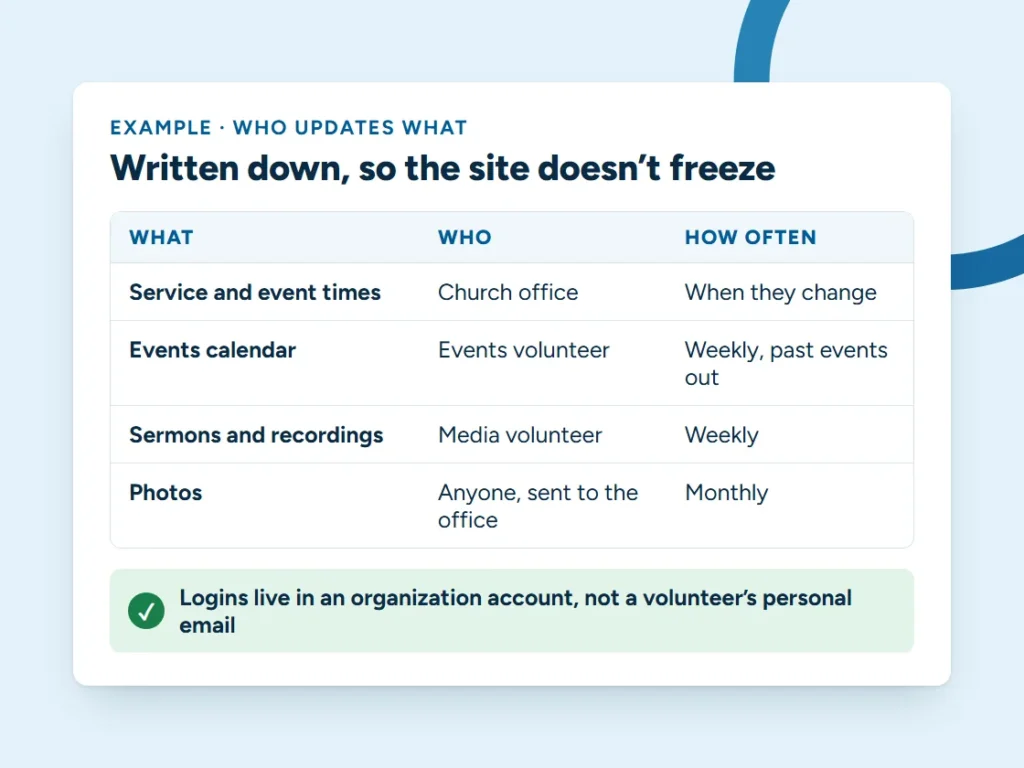
- Keep logins in an organization account, not a volunteer’s personal email.
- Choose a site anyone can edit without special skills.
- Write down who updates what, and how often.
- Or hand the upkeep to someone whose job it is. A managed website plan means events, times and photos get updated when you email a change.
Get found locally
People search for “church near me” and “food bank in Coeur d’Alene” the same way they search for a plumber. A complete Google Business Profile with correct hours, photos and service times does more for most churches and nonprofits than anything else. Our free Google Business Profile grader shows what’s missing.
Registered nonprofits may also qualify for Google Ad Grants, free search advertising from Google. Eligibility rules apply, so check with Google before planning around it.
Keep it accessible
Your audience includes older visitors and people using screen readers. Readable text sizes, good contrast, descriptions on images and buttons big enough to tap are basic courtesy as well as good practice.
If your site needs a fresh start or just someone to keep it current, see our web design service or get in touch.
Common questions
What should be on a church website’s homepage?
What a first-time visitor needs: service or event times, an address that opens in their maps app, what to expect, real photos of your people and building, and a phone number or short form someone actually answers.
How do we keep the website updated when volunteers change?
Keep logins in an organization account, not a volunteer’s personal email; choose a site anyone can edit; write down who updates what and how often; or hand the upkeep to someone whose job it is.
Can nonprofits get free Google advertising?
Registered nonprofits may qualify for Google Ad Grants, free search advertising from Google. Eligibility rules apply, so check with Google before planning around it.
Web design · Carey Enterprises
Want a website that brings in calls?
Tell us what you do and where you work. Jon will tell you what your site needs, what it would cost and how long it takes, including when a smaller plan would do.